Case Study · GTM Buddy

Ask Buddy

Real-Time AI Guidance for Sales Teams

An AI-powered sales assistant that helps reps find accurate answers, write stronger responses, handle objections, and move deals forward using deal context, buyer engagement, and approved sales content.

Role: Product Designer
Type: Enterprise SaaS, Integrated AI, Sales Enablement
Team: Product, Data Science, Engineering, Frontend
AI/UX
Sales Enablement
Enterprise B2B
GenAI Assistant
Ask Buddy · Active
Write a follow-up email for this deal
Handle a pricing objection
Summarize this deal for my manager
Suggest next-best action
Powered by deal context · buyer signals · approved content

Overview

What is Ask Buddy?

Ask Buddy is a real-time AI guidance system that helps sales reps respond faster and more confidently. It uses deal context, buyer engagement, CRM activity, and sales content to generate accurate, bite-sized answers inside the rep's workflow.

Email Responses

Write pitches, follow-ups, and objection-handling responses using deal context and approved messaging.

Next-Best Actions

Recommend content, messaging, and social proof based on deal stage, buyer, and context.

Knowledge Extraction

Capture rep and CRM conversations to surface FAQs and turn tribal knowledge into reusable guidance.

Everboarding

Generate coaching notes and keep reps aligned with best practices as the product and process evolve.

The Problem

Reps Were Searching Instead of Selling

Sales reps were spending too much time switching between tools, searching for the right content, and asking managers for answers. This slowed responses, created inconsistent messaging, and increased the risk of sending outdated or incorrect information.

6+
tools
Too Many Tools
Reps searched across Slack, Notion, decks, CMS, and old emails to find one answer
User interviews · n=15+
3x
slower
Slow Responses
Time pressure made it harder to respond accurately during live calls and emails
Workflow observation
60%
of reps
Inconsistent Messaging
Teams followed different narratives, even for the same product or objection type
Content audit findings

Why This Matters

Scattered Knowledge Slows Down Deals

When sales knowledge is scattered, reps lose confidence and managers become the fallback for repeated questions. The business impact is slower deal movement, weaker consistency, and missed chances to respond at the right moment.

For SDRs

They need quick, accurate answers while handling inbound and outbound conversations under time pressure.

For Account Executives

They need contextual guidance to handle objections, personalize messaging, and move deals forward.

For Sales Managers

They need consistency across reps without answering the same questions repeatedly at scale.

For Enablement Teams

They need a way to scale best practices and keep content useful inside daily selling workflows.

Goals

What Success Looks Like

01

Instant Contextual Answers

Help reps get accurate answers without searching across multiple tools or waiting on a manager.

02

Consistent Messaging

Make sure reps use aligned, approved, and persona-aware messaging across all conversations.

03

Reduced Search Friction

Bring relevant content and guidance into the selling workflow instead of forcing reps to leave it.

04

Scalable Best Practices

Help teams turn tribal knowledge, coaching notes, and FAQs into reusable, evergreen guidance.

Research

Understanding How Reps Search, Respond, and Sell

I started with product discovery to understand where reps lose time and confidence. I studied how SDRs, AEs, managers, and enablement leaders search for answers, respond to buyers, and use content across deals.

Rep Interviews
Content Audit
Competitive Audit
Workflow Observation
1

Rep Interviews

Spoke with SDRs and AEs to understand where they lose time, confidence, and accuracy. Interviews focused on real moments in email writing, live calls, and deal updates.

2

Content Audit

Mapped scattered sales content across decks, CMS, Notion, and internal knowledge sources to understand what existed, how it was structured, and how hard it was to find.

3

Competitive Audit

Evaluated Gong, Highspot, Seismic, Mindtickle, and emerging AI tools to map what existed, where the gaps were, and what reps actually needed that no tool was delivering.

4

Workflow Observation

Watched reps navigate deals, emails, calls, and content search moments to understand the real friction points - the workarounds, tab-switching habits, and invisible cognitive load.

What They Told Me

Reps Said

"

I waste so much time finding answers across Slack, Notion, and decks.

"

I'm never sure if the content is updated or approved.

"

I need quick responses during live calls and emails, not a search bar.

Managers Said

"

Consistency is a huge problem. Reps say different things for the same product.

"

Content exists everywhere, but nobody can find it fast.

"

We need a way to scale best practices across teams without being the fallback.

Competitive Audit

What Existed vs. What Was Needed

Most sales enablement tools helped with content storage, coaching, or AI-generated responses. But the opportunity for Ask Buddy was to combine search, deal context, persona-aware messaging, and workflow-embedded guidance into one assistant.

Capability Highspot Seismic Mindtickle GTM Buddy Ask Buddy ✦
Context-based Answers Supports content discovery, but answers depend on available content structure. Strong enablement content layer, but contextual assistance can feel limited. Focuses more on learning and readiness than live selling answers. ✓ Uses deal context, buyer engagement, and sales content to generate relevant answers.
Deal-aware Suggestions Helps surface content, but not always tied to deal stage or buyer context. Offers some AI assistance, but guidance may not fully reflect deal movement. Limited support for deal-specific next-best actions. ✓ Suggests messaging, content, and next-best actions based on the active deal.
Persona-based Messaging Content can be organized by persona, but response generation is limited. Persona context may depend on manual setup and content tagging. Less focused on buyer-persona-specific sales messaging. ✓ Generates messaging using buyer persona, objections, and sales context.
Auto-generated FAQs Mostly depends on manually maintained content. Can support knowledge discovery, but not always auto-published from rep conversations. Limited compared to sales-content intelligence systems. ✓ Captures rep/CRM conversations and turns tribal knowledge into reusable FAQs.
AI-powered Email Responses Can assist with AI writing, but may not be deeply deal-aware. Supports AI-generated content, but can feel separated from live deal workflow. Can support AI learning responses, but less focused on active deal communication. ✓ Generates ready-to-send sales emails using deal, persona, and content context.
Workflow-embedded Guidance Strong content platform, but reps may still need to search. Helpful enablement ecosystem, but guidance can sit outside daily rep flow. Strong training orientation, but less embedded in live selling moments. ✓ Brings guidance directly into the rep's daily sales workflow.

Existing tools solved parts of the problem - content access, training, or AI writing. Ask Buddy's opportunity was to connect all three: instant answers, contextual guidance, and consistent messaging inside the sales workflow.

Personas

Three Roles, One AI Guidance System

Ask Buddy needed to support the people who ask questions, act on answers, and manage consistency across the team. Each role shaped how the assistant surfaced content, generated responses, and built trust.

SDR

Core Job

Handles inbound and outbound conversations where speed and accuracy are equally important.

Key Need

Quick answers, ready-to-send email drafts, and confidence during live prospecting conversations.

Frustration

Searching across multiple tools for answers that should be instant and already approved.

Account Executive

Core Job

Manages active deals through objections, follow-ups, personalized messaging, and closing conversations.

Key Need

Deal-aware answers, objection handling, persona-based messaging, and next-best-action recommendations.

Frustration

Generic AI output that doesn't reflect the deal, the buyer, or the stage they're actually in.

Sales Manager / Team Lead

Core Job

Maintains team consistency, provides coaching, and ensures reps are using approved messaging.

Key Need

A centralized source of truth, visibility into rep questions, and consistent messaging across the team.

Frustration

Answering the same questions repeatedly and having no scalable way to spread best practices.

These roles helped define how Ask Buddy should deliver fast answers, maintain consistency, reduce manager dependency, and support accurate customer communication across the sales funnel.

User Journey

From Question to Confident Response

1

Working on email, call, or deal

2

Rep asks Ask Buddy a question

3

Reads deal, buyer, content context

4

AI generates answer or email draft

5

Rep reviews and edits

6

Applies answer in workflow

7

Ask Buddy captures knowledge

8

Manager sees patterns and gaps

9

Team improves messaging over time

The journey was designed to reduce search pressure. Instead of forcing reps to leave their workflow, Ask Buddy brings guidance into the moment when they need it most.

Information Architecture

Structuring an AI Guidance System

The IA was structured around how reps move from uncertainty to action: ask a question, receive a contextual response, validate the source, apply the answer, and reuse the knowledge later.

Ask Buddy Entry Point
Prompt Starters
Email Writing
Pitches, follow-ups
Objection Handling
Pricing, timing, risk
Deal Summaries
Context snapshots
Content Recommendations
Decks, case studies
Follow-up Drafts
Post-call outreach
Conversation Interface
Ask a Question
Free input
Refine Output
Edit and improve
Copy and Apply
Use in workflow
Continue Thread
Follow-up questions
Source View
Where it came from
Feedback Signal
Rate the answer
Core Intelligence Layer
AI Guidance Layer - Context + Content + Reasoning
The core intelligence layer reads the rep's question, understands deal context, retrieves approved content, applies buyer and persona logic, and generates a usable answer with confidence. Making this layer visible - not hidden - was the most important IA decision.
Reads rep question Understands deal context Retrieves approved content Applies persona logic Generates answer Shows confidence Cites source
Deal Context Layer + Content Knowledge Base
Account Info
Company, industry
Opportunity Data
Stage, value, risk
Buyer Signals
Engagement, intent
Approved Playbooks
Sales narratives
FAQs + Case Studies
Validated knowledge
Decks + Docs
Approved assets
Knowledge Capture + Manager Insights
Repeated Questions
FAQ generation
Useful Answers
Reusable knowledge
Content Gaps
What reps can't find
Coaching Patterns
Manager insights
Entry Point
System Layer
Module
Feature
AI Layer

Design Decisions

Solving the Hard Problems

01
Prompt Starters Before Blank Input
A blank chat box can feel unclear, so I added suggested prompts for common sales moments. This helped reps understand what Ask Buddy could do and start faster without having to figure out the right question.
Ask Buddy prompt starters showing suggested questions for common selling moments
02
Guidance Inside the Workflow
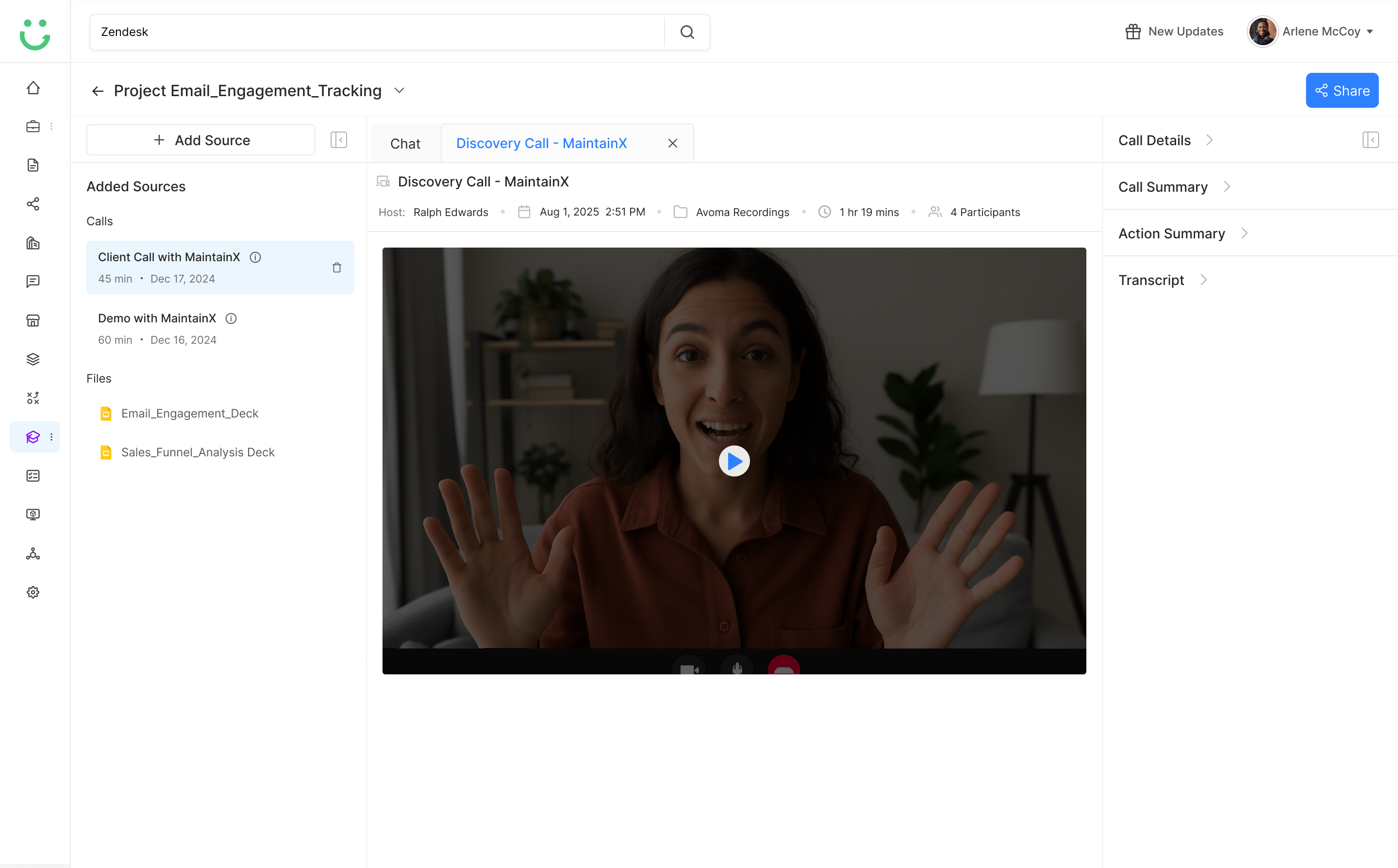
Instead of making reps search another content library, Ask Buddy was designed to sit close to sales tasks like emails, calls, and deal updates. The goal was to reduce switching and keep reps moving without ever leaving their context.
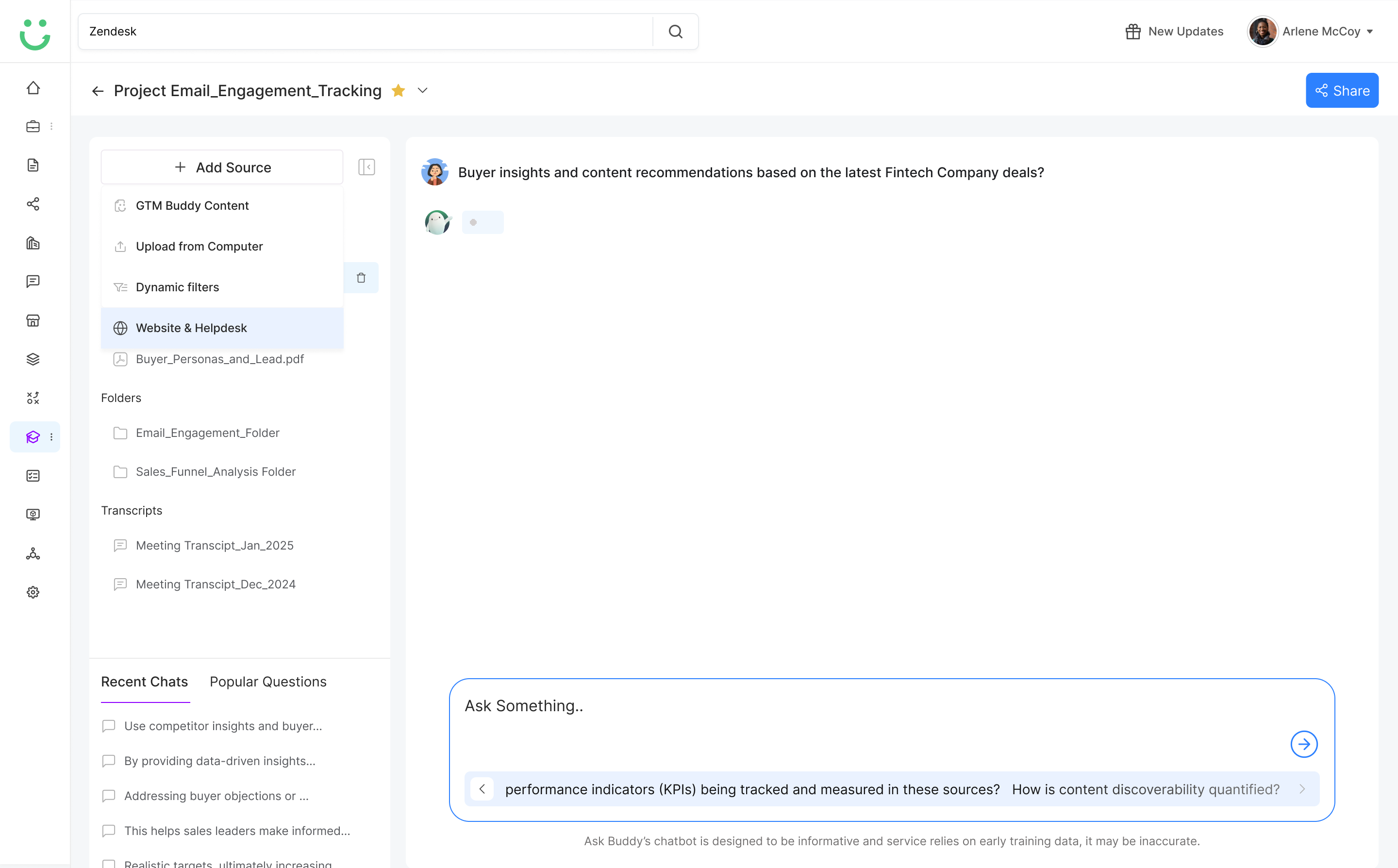
Ask Buddy interface with source panel open alongside the chat
03
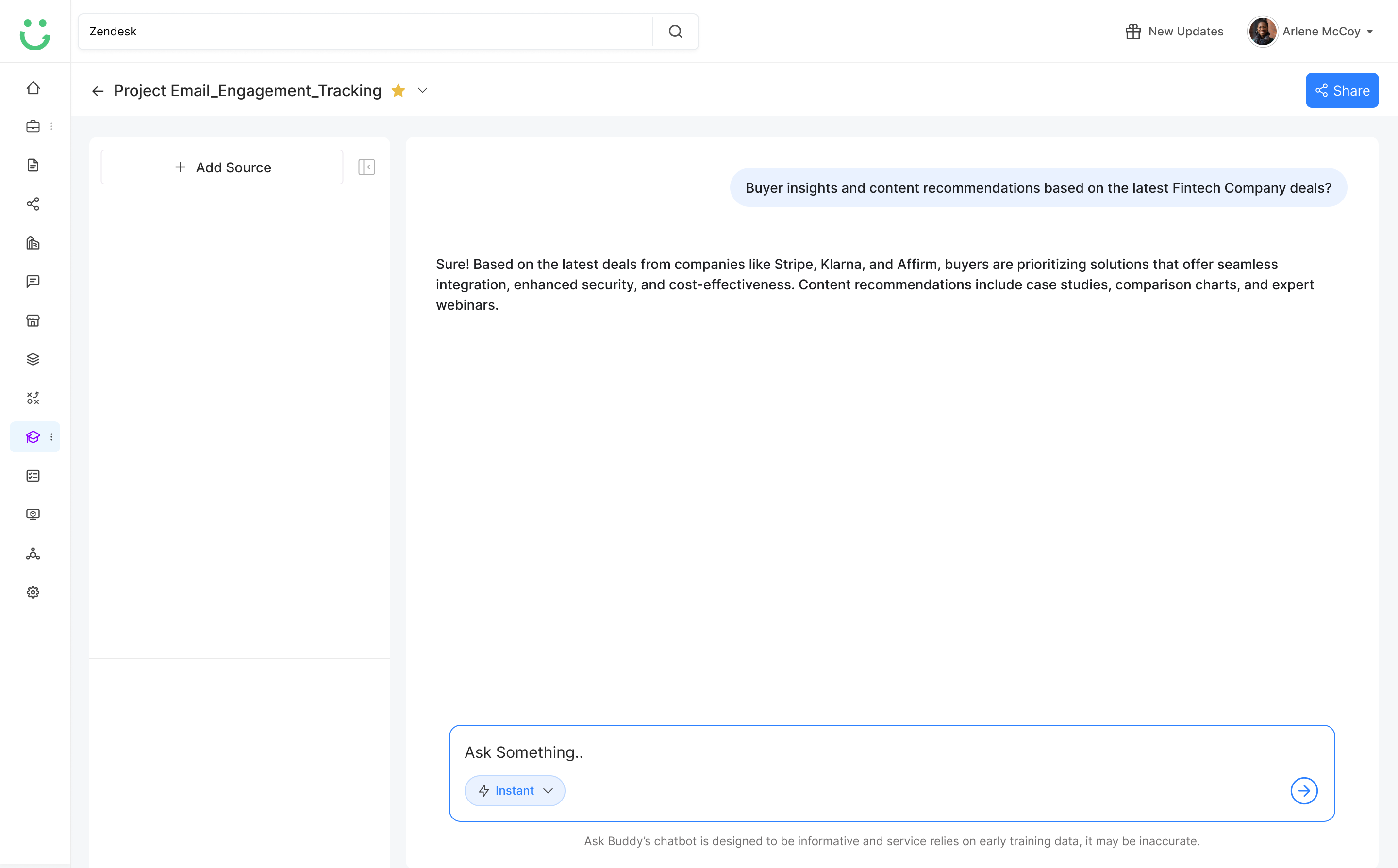
Contextual Answers, Not Generic AI Copy
Ask Buddy needed to respond with deal-aware guidance, not generic AI output. I prioritized buyer context, content sources, objections, and sales stage to make answers more usable and closer to what reps would actually send.
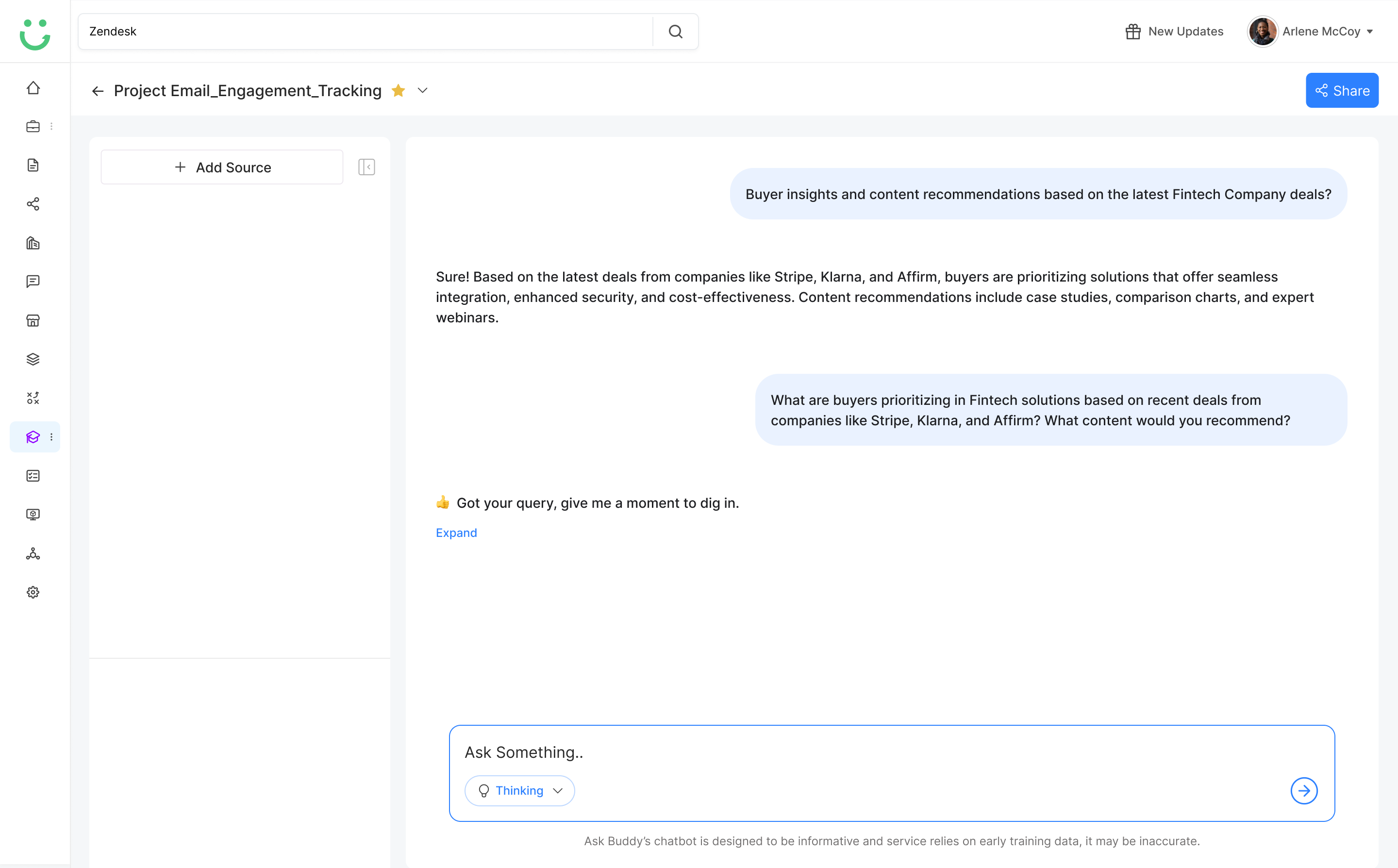
Ask Buddy responding with contextual answer and thinking confirmation
04
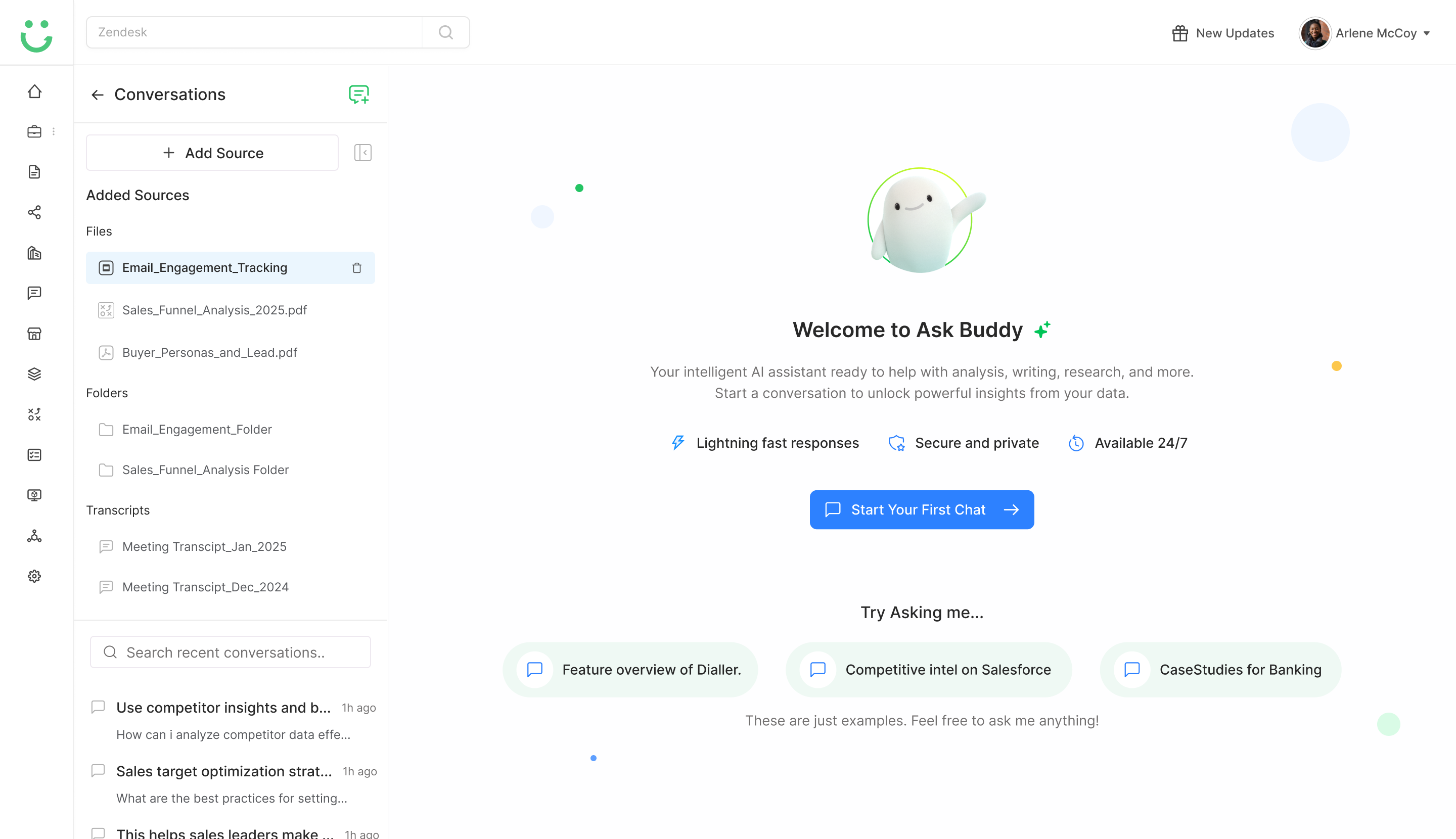
One Workspace: Sources, Chat, and Agents
The desktop layout keeps Sources on the left, the conversation in the center, and Popular Agents on the right. Reps can see where an answer comes from and act on it without switching context, so guidance stays fast but grounded.
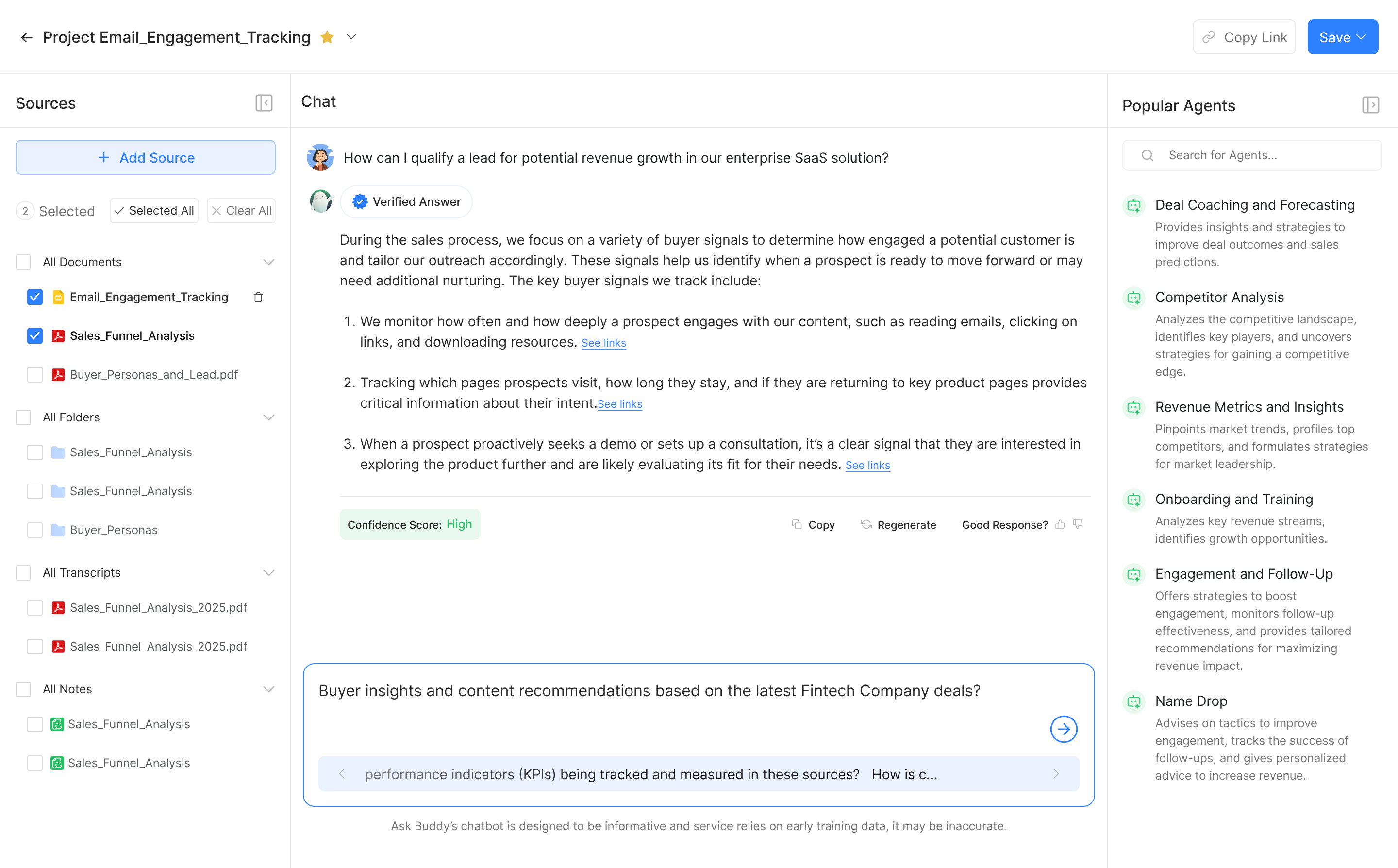
Ask Buddy desktop layout showing Sources panel, Chat with verified answer, and Popular Agents sidebar
05
Content Trust Signals
Because reps worried about outdated content, the experience needed to show where answers came from and whether the source was approved or current. Transparency about sources made the AI feel more trustworthy, not less.
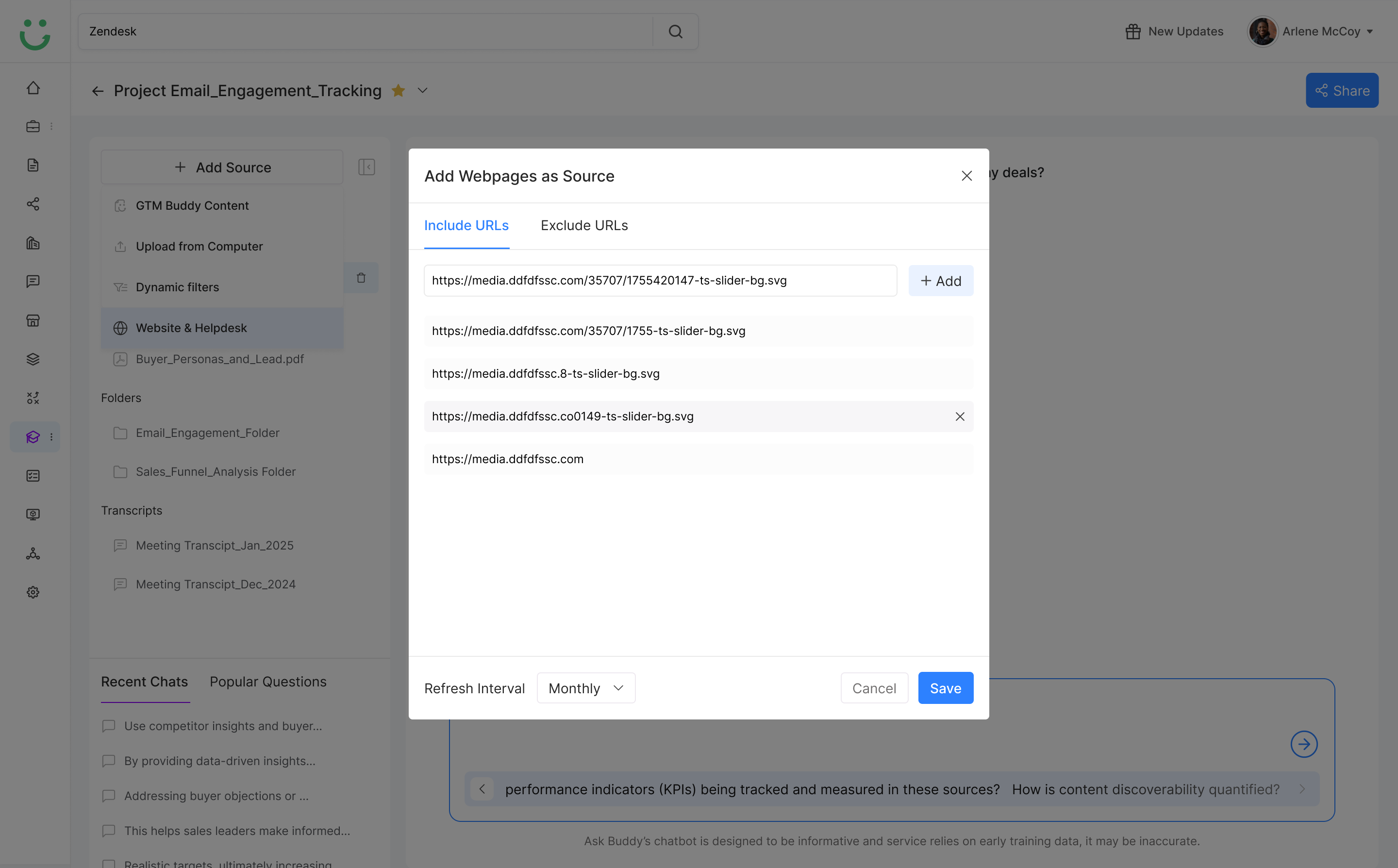
Add Webpages as Source modal showing URL inputs with include and exclude tabs
06
Knowledge Capture as a Byproduct
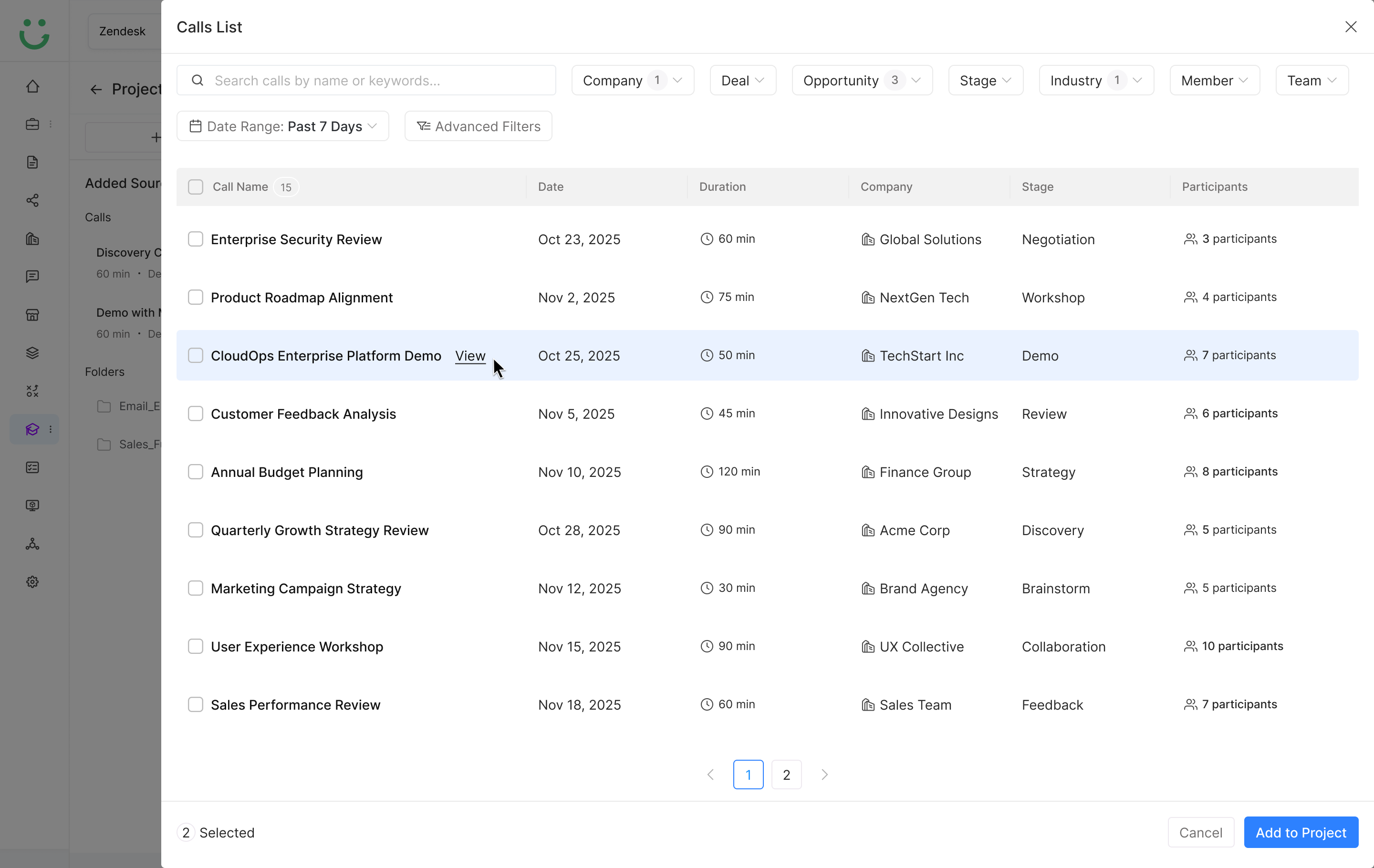
Repeated rep questions were not just support requests. I treated them as signals to identify content gaps, generate FAQs, and improve enablement over time - turning daily usage into a knowledge engine for the team.
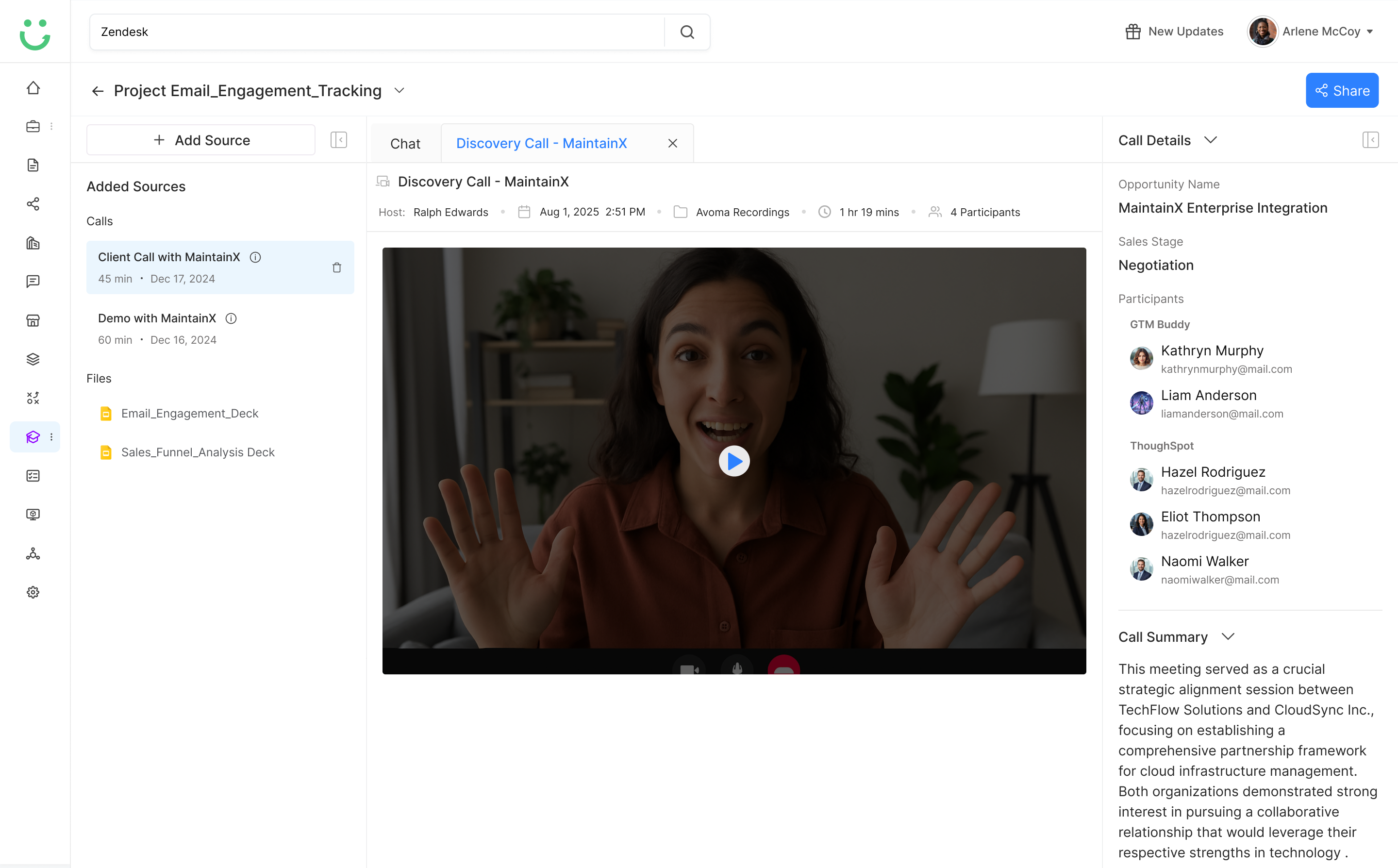
Call details panel expanded showing opportunity name, sales stage, participants, and call summary
07
Manager Visibility Without Micromanagement
Managers needed to understand what reps were struggling with, but not review every interaction. I designed insights around patterns, gaps, and recurring questions - not individual chat logs - so the view felt like coaching, not surveillance.
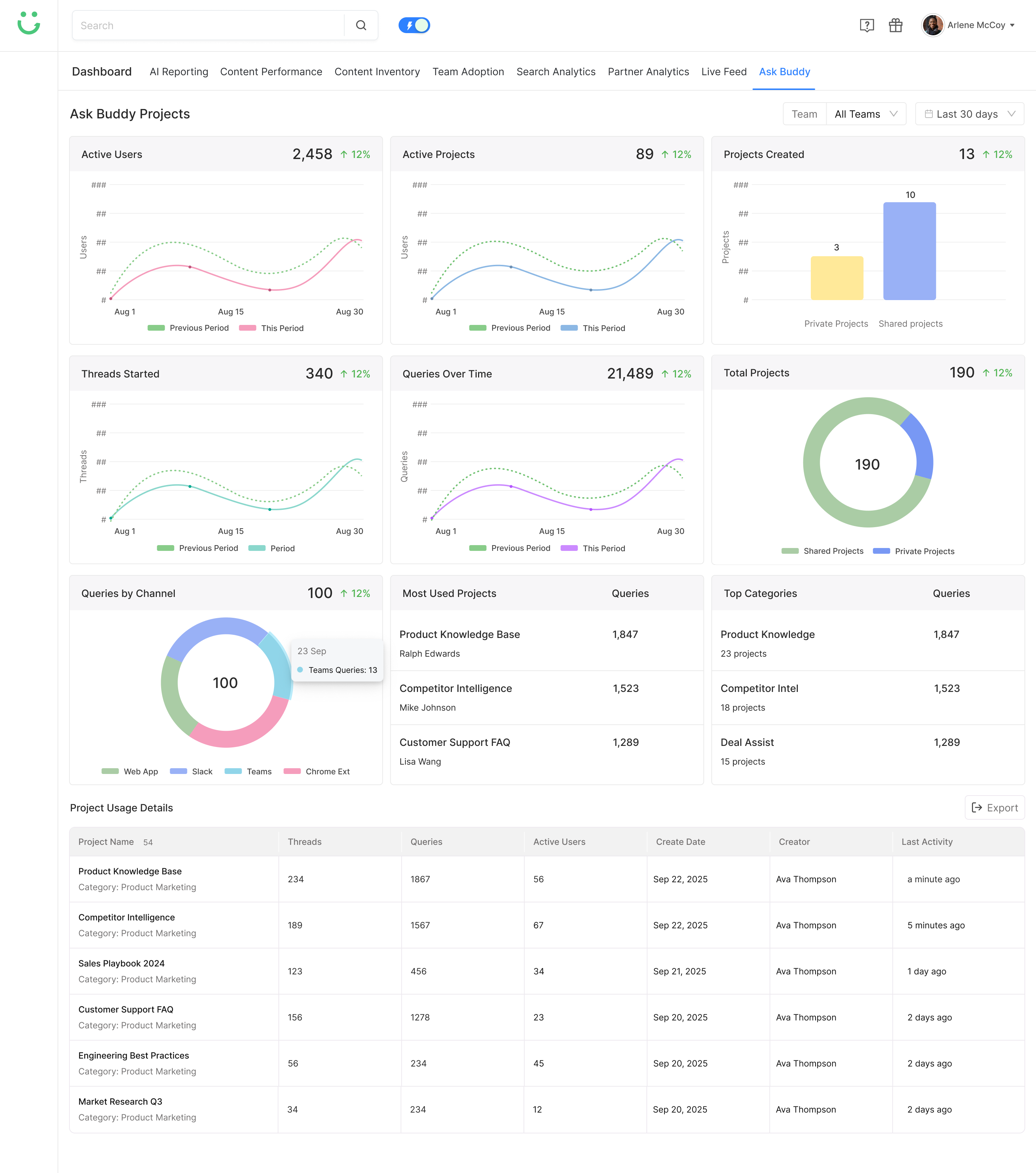
Ask Buddy Projects dashboard showing active users, queries, project usage, and top categories

Other Design

Exploring the Full Ask Buddy Experience

Beyond the core chat experience, I explored supporting screens that helped reps ask better questions, use AI responses safely, and helped managers understand where the team needed better guidance.

Ask Buddy prompt starters showing suggested questions for common selling moments

Prompt Starters - suggested prompts surfaced before the rep types, reducing blank-input anxiety and showing what Ask Buddy can do

Model selection dropdown open showing Instant and Thinking options

Reasoning Model Selector - lets reps choose between Instant mode for quick answers and Thinking mode for deeper analysis

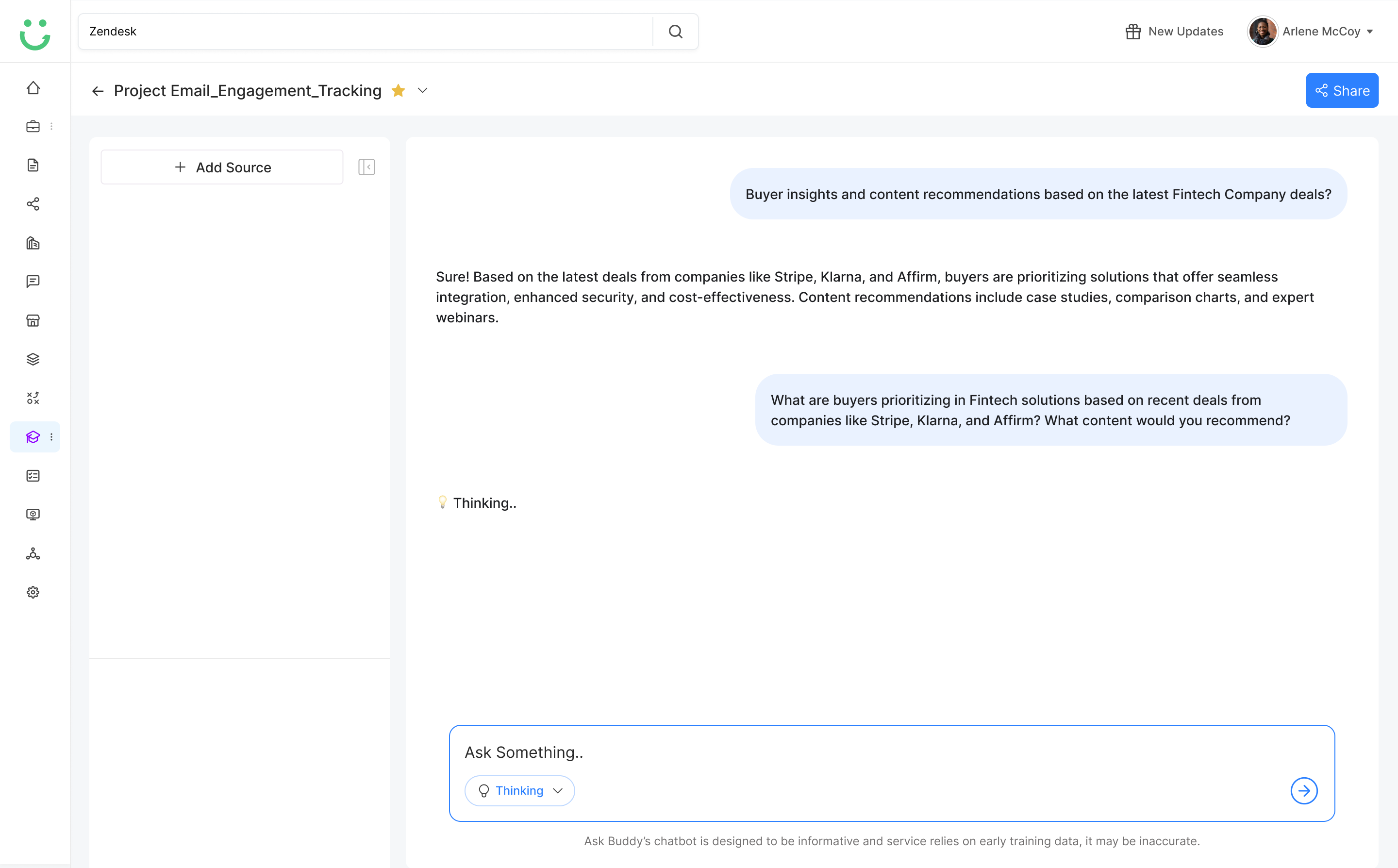
Ask Buddy in Thinking mode showing a Thinking status while processing the query

Thinking Model - Generating - live status shown while the model works through a more complex reasoning request

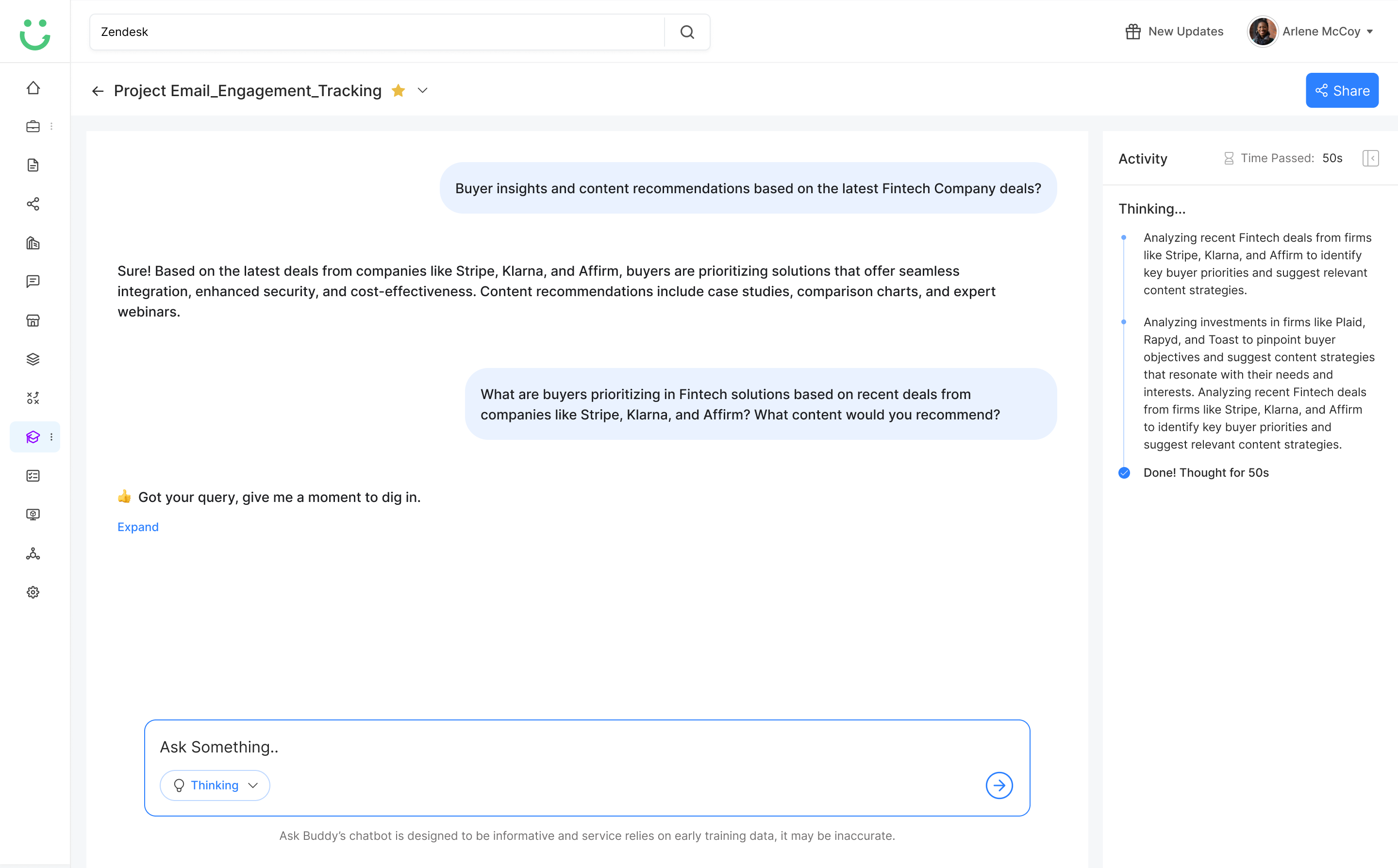
Thinking model with expanded Activity panel showing step-by-step reasoning trace

Reasoning Trace - Expanded - the Activity panel surfaces each thinking step so reps can verify how the answer was reached

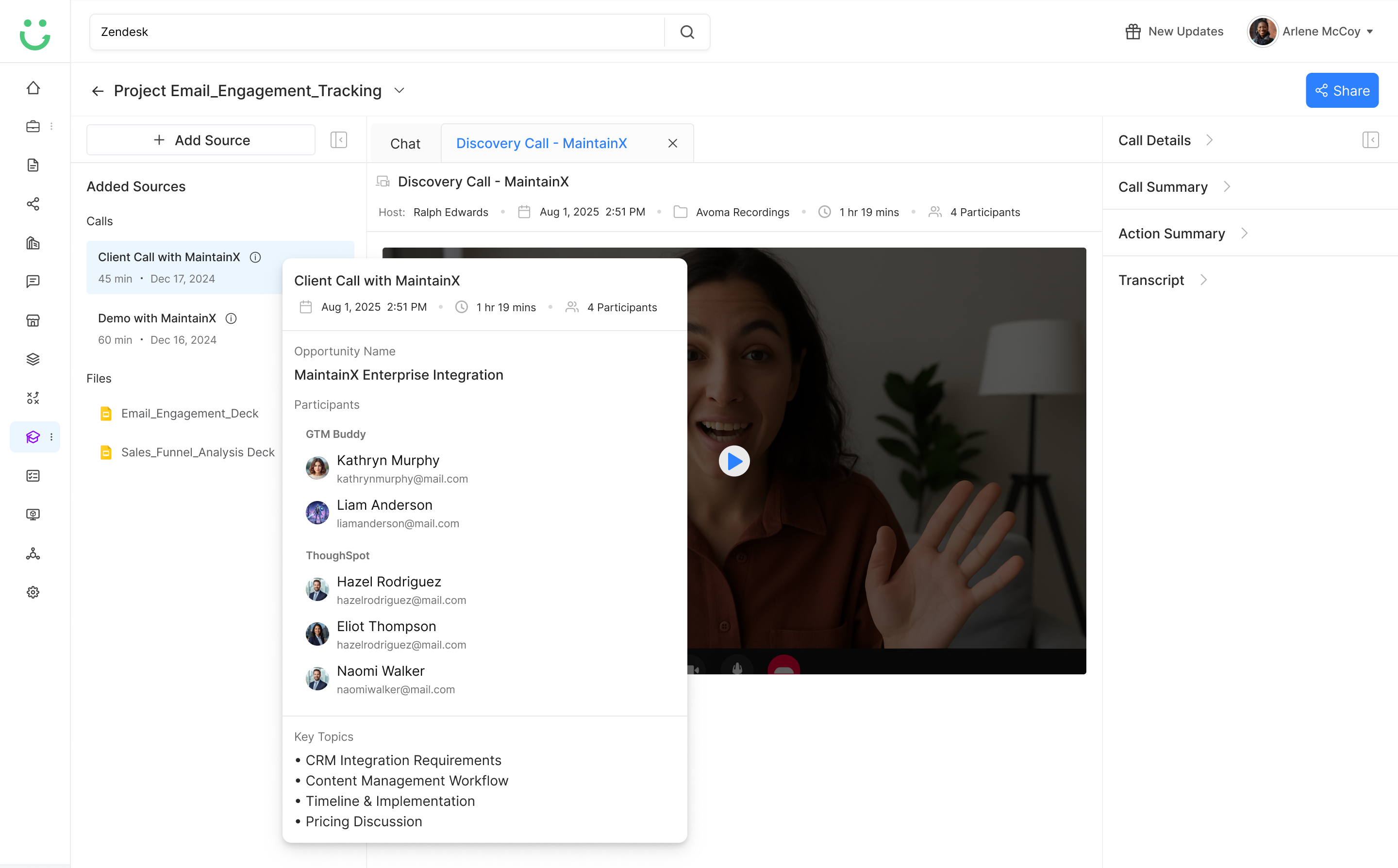
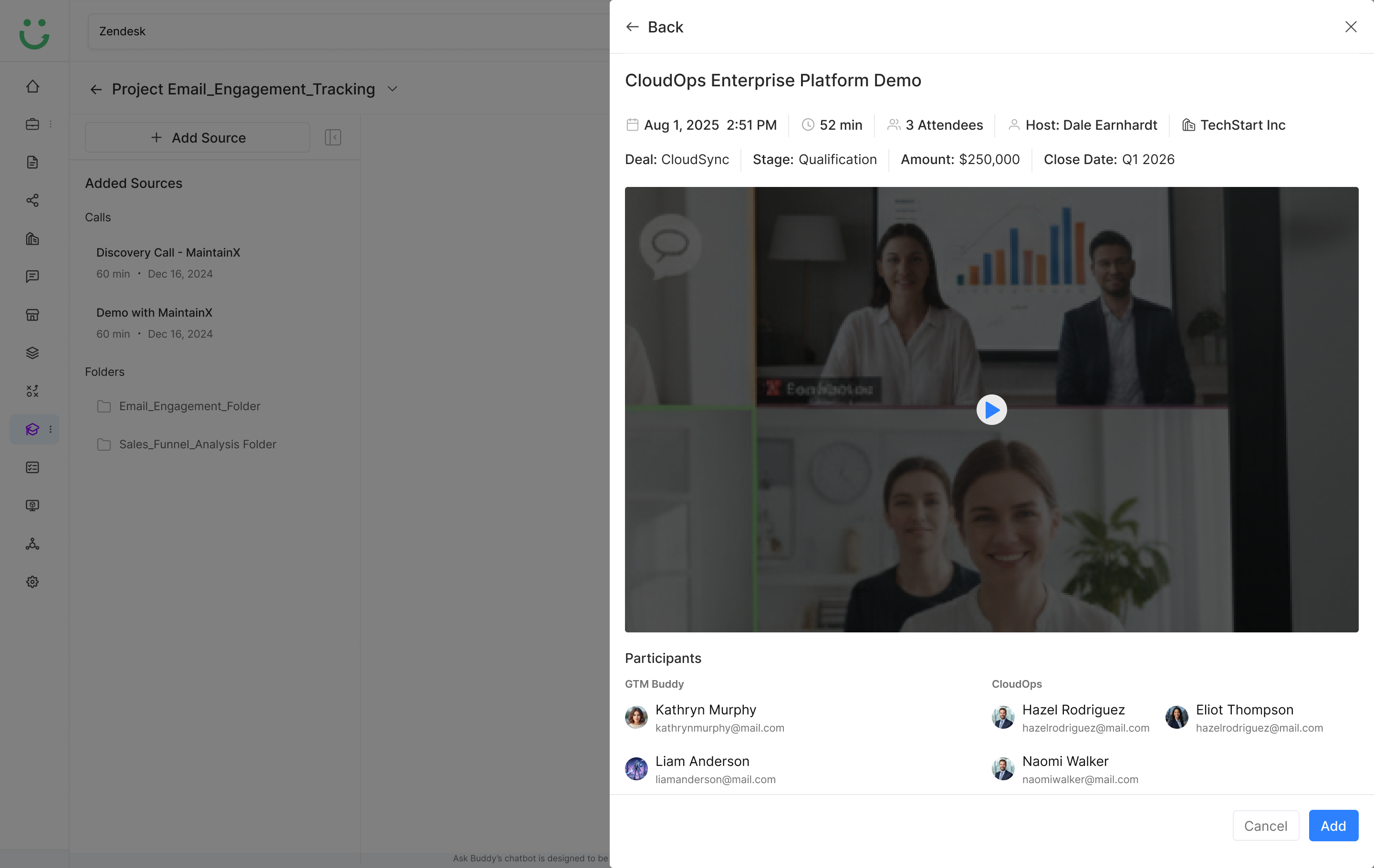
Call detail popup showing video thumbnail, participants, opportunity name, and key topics

Call Details Popup - quick overview of a meeting source with participants, opportunity name, key topics, and recording thumbnail

Call details in collapsed view showing call name and date in the source panel

Call Details - Collapsed - compact source entry showing call name and date, expandable for full context without cluttering the panel

Hover state on a meeting source showing quick action options

Meeting Source Hover State - reveals quick actions (view details, remove) without leaving the chat flow

Two side drawers open simultaneously showing source panel and call details together

Double Drawer - source panel and call details open side by side, keeping full context visible while staying in the chat

These supporting designs helped turn Ask Buddy from a simple AI assistant into a broader sales guidance system for answering, coaching, and improving team knowledge.

Impact

Faster Answers, Better Adoption

3x

Faster Responses

Reps could get useful answers without searching across multiple tools

70%

Improved Consistency

Teams had a stronger way to align messaging across reps

+40%

Better Adoption

The experience became more flexible and closer to real sales needs

50%

Reduced Manager Dependency

Repeated clarification questions could be handled through AI guidance and reusable knowledge

The project evolved through active iterations. By focusing on core user needs instead of feature overload, Ask Buddy became faster, more flexible, and more relevant to everyday sales workflows.

Learnings

What I Learned Designing AI Sales Guidance

01

Speed is not enough.

Reps need fast answers, but they also need trust that the answer is accurate and safe to use in a real customer conversation.

02

Context makes AI useful.

Generic AI copy does not solve sales problems. The value comes from combining deal, buyer, content, and messaging context into a single answer.

03

Prompting needs guidance.

Most reps do not know what to ask at first. Prompt starters helped reduce hesitation and made the assistant feel easier to use from the start.

04

Trust needs UI support.

Source visibility, editability, and feedback controls are important when AI is helping reps communicate with real buyers in live deals.

05

Manager insights should focus on patterns.

The manager experience should highlight recurring questions, content gaps, and coaching opportunities instead of monitoring every rep message.

Next Project

Designing Ask Buddy taught me that AI assistants in B2B SaaS should not just generate answers. They should reduce friction, build confidence, and help teams stay aligned in the moments that affect revenue.

View Next Project → Back to Portfolio
Agentic Workflow Builder - Build Workflows That Think →